

Keep 3D printing.FoxTrack keeps track.
Quotes, orders, invoices, filament and printers in one app, for shops that sell 3D prints. Built by a print shop that outgrew its spreadsheets.
Free plan · No card needed
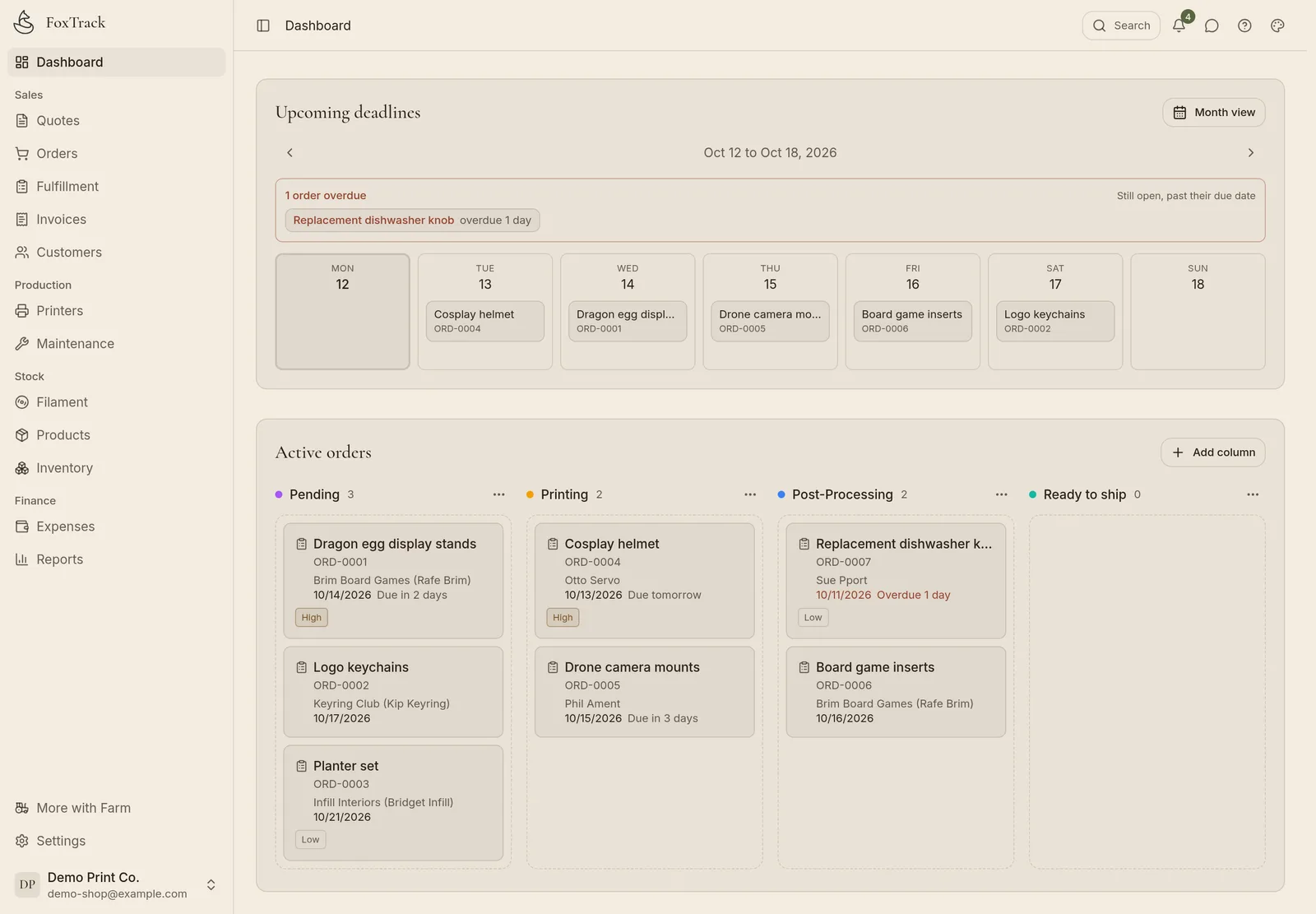
Every print job takes four steps, and FoxTrack has a page for each.
 1
1An order comes in
Type it in, or let your website send it over.
 2
2Filament comes off the shelf
Each order takes the filament and parts it uses.
 3
3A printer runs it
Jobs wait in each printer's queue. Watch them live with Bridge.
 4
4The invoice gets paid
Quote from your real costs, send the invoice, mark it paid.

Orders from your website and your online store.
A customer orders on your website or online store. A moment later the order is in FoxTrack, with the customer and the prints filled in.
- CloudSlicer3D
- Shopify
- Etsy
- WooCommerce
CloudSlicer3D on Pro and Farm, with a paid CloudSlicer3D plan. Shopify, Etsy and WooCommerce on Farm (beta): sold products come off your stock, and tracking goes back when you ship. On Pro, import the order file Etsy lets you download.
dragon-egg.stl
PLA Matte · Black · 0.2 mm · Qty 2
Order #0051 · Kip K.
From CloudSlicer3D · Due Friday
dragon-egg.stl × 2
PLA Matte · Black
How each step works.
Step 1 · Orders
Every order on one board.
Each piece of an order shows whether it is printed, packed or still waiting.
Order #0042 · Ada O.
Due Friday · High priority
Vase small × 2
Vase medium × 2
Vase large × 2
Step 2 · Materials
See your stock before a print starts.
Each order deducts its filament and parts, and low stock warns you before you run out.
PLA Matte · Black
PETG · Clear
PLA Silk · Gold
Spool #0117 · PETG · Clear
Scan after a print to log the grams it used.
Step 3 · Machines
Printer hours and running costs.
Track print hours and maintenance, and watch printers live with FoxTrack Bridge.
Bambu Lab X1C
Live · via FoxTrack Bridge
Nozzle 220° · Bed 60° · 1,284 print hours
Vase medium × 2 #0042
PrintingKeychain × 10 #0044
PendingStep 4 · Money
Quote from cost, send the invoice, see your profit.
See what each print costs you before you name a price. Quotes become orders and invoices without retyping.
Vase small × 2
52 g PETG · 1.9 h · P1S #2
$28.00
cost $7.10
Vase medium × 2
84 g PETG · 3.2 h · X1C
$36.00
cost $9.72
Vase large × 2
140 g PETG · 5.1 h · P1S #2
$48.00
cost $12.32
The rest of the shop.
Customers
Order history and spend for every buyer.
Team
Invite helpers with a link.
Import and export
CSV in, CSV out.
The assistant
Bring your own AI key. It drafts, you save.
API and webhooks
For your own tools, on Farm.
Currency and tax
Any currency. Your tax label and number print on invoices: GST, VAT or sales tax.
Keep your printer app
Already on Printago or SimplyPrint? Keep it for the printers. FoxTrack runs the orders, stock and money.
On your phone
Runs in the browser. Add it to your home screen.
We're Caleb and Clarissa. We built FoxTrack when spreadsheets stopped working for our shop, Fox & Train, and we still run it on FoxTrack every day.


Caleb and Clarissa Ellis
Read the whole story →Emails from our print shop, plus what is new in FoxTrack.
Pricing, stock and shipping, from what works at Fox & Train.
Start free. Pay when you need more.
Full pricing and yearly billing →For one person and one printer, selling a few prints a month.
- 1 printer, 10 spools
- 5 products, 10 inventory items
- 10 orders, 3 quotes and 3 invoices a month
- Quote and invoice PDFs, sent by email
For a shop that quotes, invoices and needs to know its numbers.
- 5 printers, unlimited orders
- 30 products, 100 spools, 50 inventory items
- Unlimited quotes and invoices, plus reports
- CloudSlicer3D order import
- Etsy order file import
- Shipping labels with your own Shippo, ShipStation or EasyPost account
- Live printers and the AI assistant (with your own API key)
- 2 team members
For a farm or a team that has outgrown every limit.
- Everything in Pro
- Unlimited printers, orders and products
- Shopify, Etsy and WooCommerce order sync (beta), API and webhooks
- Print planner: what to print on which printer, and when
- 10 members, 2 workspaces, white label
Try it on your next order.
Free for 1 printer and 10 orders a month. No card.