

3D print farm management software
FoxTrack watches your printers, plans what each one prints next, and keeps the orders, filament and stock behind them in step. It is made by Fox & Train, a print shop that uses it every day.
Can I see every printer at once?
Yes. FoxTrack Bridge is a small open source program that runs on a computer in your shop. It reads Klipper, Bambu Lab (in LAN Only Mode, or through your Bambu account, still experimental), Prusa (PrusaLink) and OctoPrint printers, plus any printer Home Assistant knows, for status only. It streams progress, temperatures and camera pictures into FoxTrack.
The Printers page has Fleet, Live, Cameras and Alarms views. On most linked printers you can pause, resume or stop a print and switch the light from any device, and send a sliced file to the printer. What a printer accepts depends on its type and connection.
How does FoxTrack decide what each printer prints?
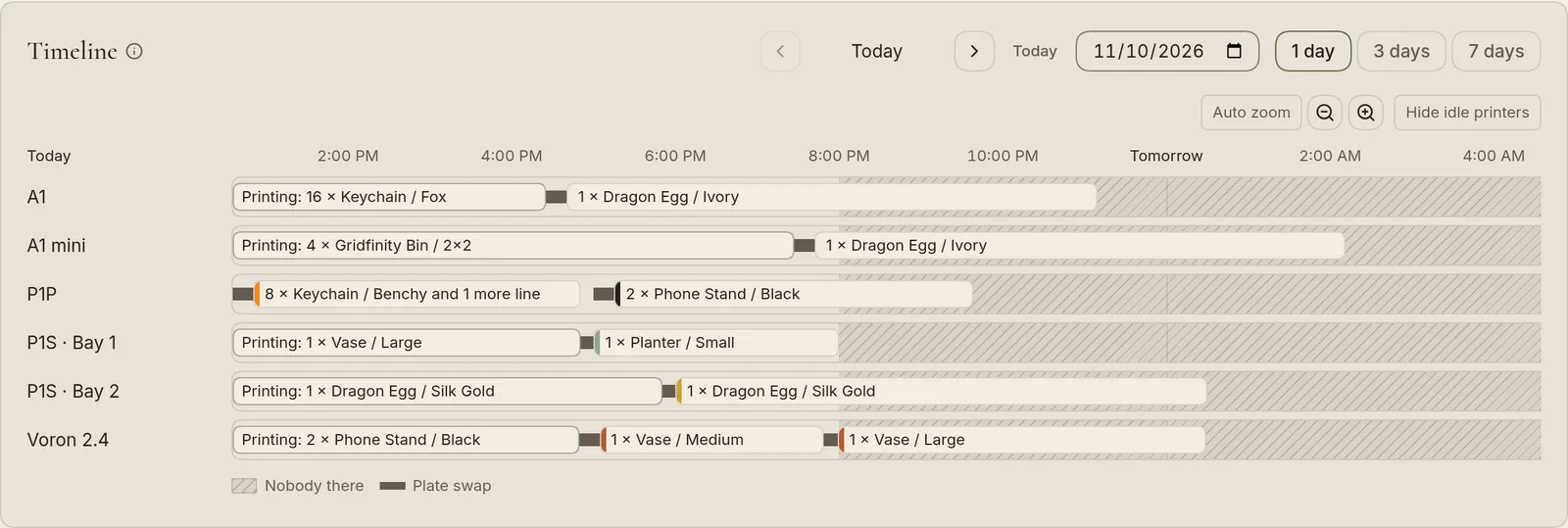
The print planner (on the Farm plan) puts every order line that still has to print onto a printer and says when to be there. It follows fixed rules, with no AI. The earliest due date goes first. A plate goes to the printer that can start it first, preferring one that already has the right spools. It never uses a printer that is too short for the part, or one marked In maintenance, Offline or Retired.
Turn on Keep the queue going for a printer linked to Bridge. When a print ends, FoxTrack asks Print done. Plate clear? Press Plate clear, send next and the next file goes to the printer.
How do orders, filament and stock stay in step?
Every line left to print goes on the print queue with its own status and printer. Saving an order takes filament grams or finished pieces off your stock at once. When a Bridge print ends, FoxTrack can take the grams it used off the spool in that slot. To print for a shelf or a market stall, draft a restock run from what sold or fell below its minimum, then press Start printing. Stock moves only when you complete the run.
What does FoxTrack tell me, and where?
A print that finishes, fails, is canceled or pauses, a printer error, and a printer that goes quiet mid-print all reach the bell. You can send them to Telegram, Discord, Slack or email too, with the printer's camera picture when Bridge has one. A failed print names the order line that was on the printer. Maintenance schedules raise a reminder when service is due.
Who can use it, and what do reports show?
A workspace holds 1 member on Free, 2 members on Pro and 10 members on Farm, with owner, admin and member roles. Reports show each printer's hours printed, prints finished and failed, success rate and share of time spent printing. Reports are on the Pro and Farm plans and open to owners and admins.
Questions
Does FoxTrack slice models?
No. You slice in your slicer and attach the sliced file to a product variant. FoxTrack sends it to a printer through Bridge. With Bridge 2.5.2 or later, OrcaSlicer and PrusaSlicer can also send a file to FoxTrack through Bridge's virtual printer.
Do I need Bridge to use the planner?
No. The planner works from your orders, your products and the printers you add by hand. Bridge adds live status, so the planner knows when a printer is free. Without it, choose Printer busy until in a printer's card menu, and Free now when it is free.
What does Bridge run on?
A computer on your shop network that stays on. Bridge is an open source companion app, and its code is on GitHub.
How many printers can I add?
A workspace can have 1 printer on Free, up to 5 printers on Pro and any number of printers on Farm. Bridge needs the Pro and Farm plans. The pricing page has the details.
Can the planner start prints without me?
No. Nothing goes to a printer until you press a button such as Print or Plate clear, send next. There is no camera check, so you are the check.
Read more
Run your print farm on FoxTrack
Make a free account, add a printer and see your orders and filament in one app.
Free plan · No card needed